iPad ↔ Mac

Your iPad. Your Mac. One tap away.

A native app on both ends. Install on the Mac, install on the iPad, pair with a 4-digit PIN — sub-5 ms latency, Apple Pencil pressure, Magic Keyboard trackpad, audio in sync. No iCloud, no cloud relay.

Free forever No account Paired in ~27 seconds
Streaming

Why iPad to Mac feels different on Remio.

Both ends are native SwiftUI — no Electron, no browser tab. The Mac host captures with ScreenCaptureKit and hardware-encodes for 4K 60 fps; the iPad decodes HEVC on VideoToolbox with zero buffering, so on the same Wi-Fi latency stays under 5 ms and glass-to-glass under 20 ms. On a ProMotion iPad Pro that climbs to 120 Hz when the Mac source supports it. Audio routes back in sync, and the clipboard syncs both ways.

Every pixel and keystroke is encrypted end-to-end — the keys never leave your two devices.

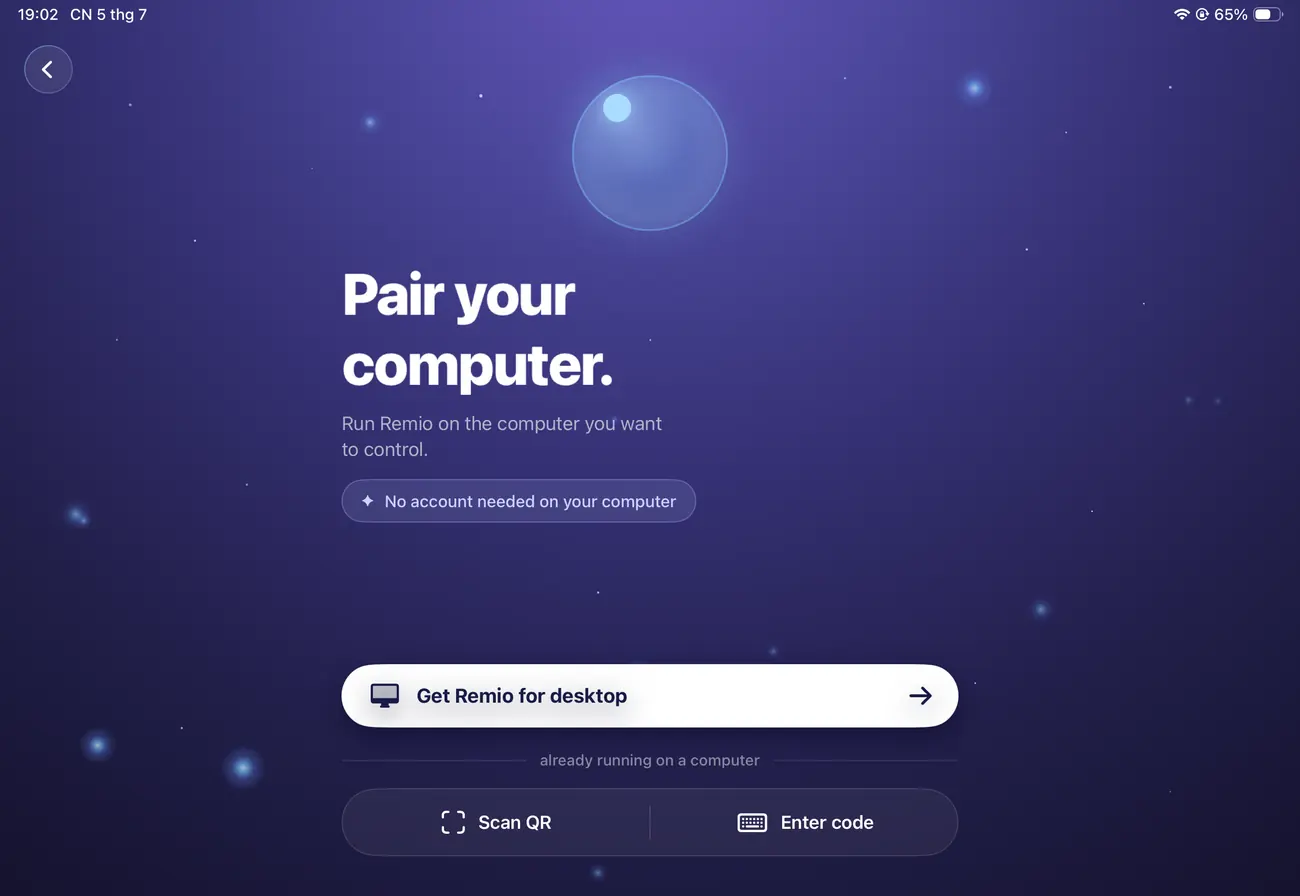
The Remio pairing screen on iPad
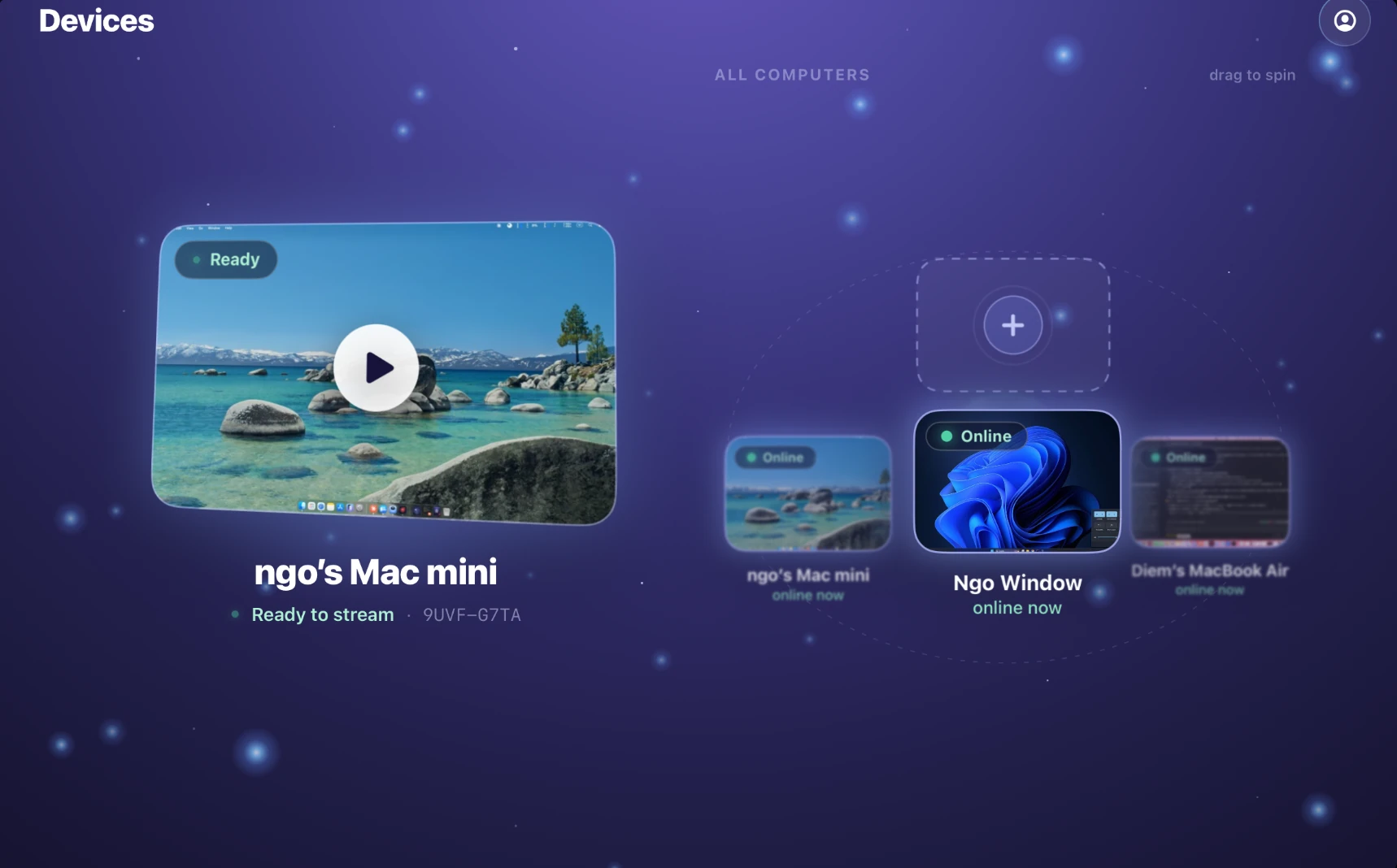
The full Mac desktop that Remio streams to an iPad
Pencil & keyboard

Apple Pencil pressure, Magic Keyboard trackpad.

The Apple Pencil forwards to the Mac as native tablet input with full pressure, tilt, and azimuth — Procreate, Photoshop, Affinity, and Fresco read 1:1 pen data, nothing averaged or normalized. The Magic Keyboard forwards every key and its trackpad keeps its inertial scroll curve, so two-finger scroll and pinch-to-zoom behave like a real Mac trackpad — and a three-finger swipe on the screen switches between Spaces, just like on a Mac.

Cmd shortcuts, the function row, and modifier keys all land on the Mac exactly as written.

Setup

30 seconds from install to streaming.

Two installs, one PIN, no account. Average measured setup is 27 seconds; reconnections take about one.

01

Install Remio on the Mac

Download the host from remio.net/download — a signed, notarized Developer ID build, so no Gatekeeper right-click needed. Launch it once and grant Screen Recording in System Settings → Privacy & Security. It's up in under two seconds.

02

Install Remio on the iPad

Get Remio from the App Store, or open remio.net/download on the iPad. It's a universal binary — the same app runs on iPhone and iPad Pro. Launch it and it opens to a pairing screen with a number pad and a QR scanner.

03

Scan the QR or type the PIN

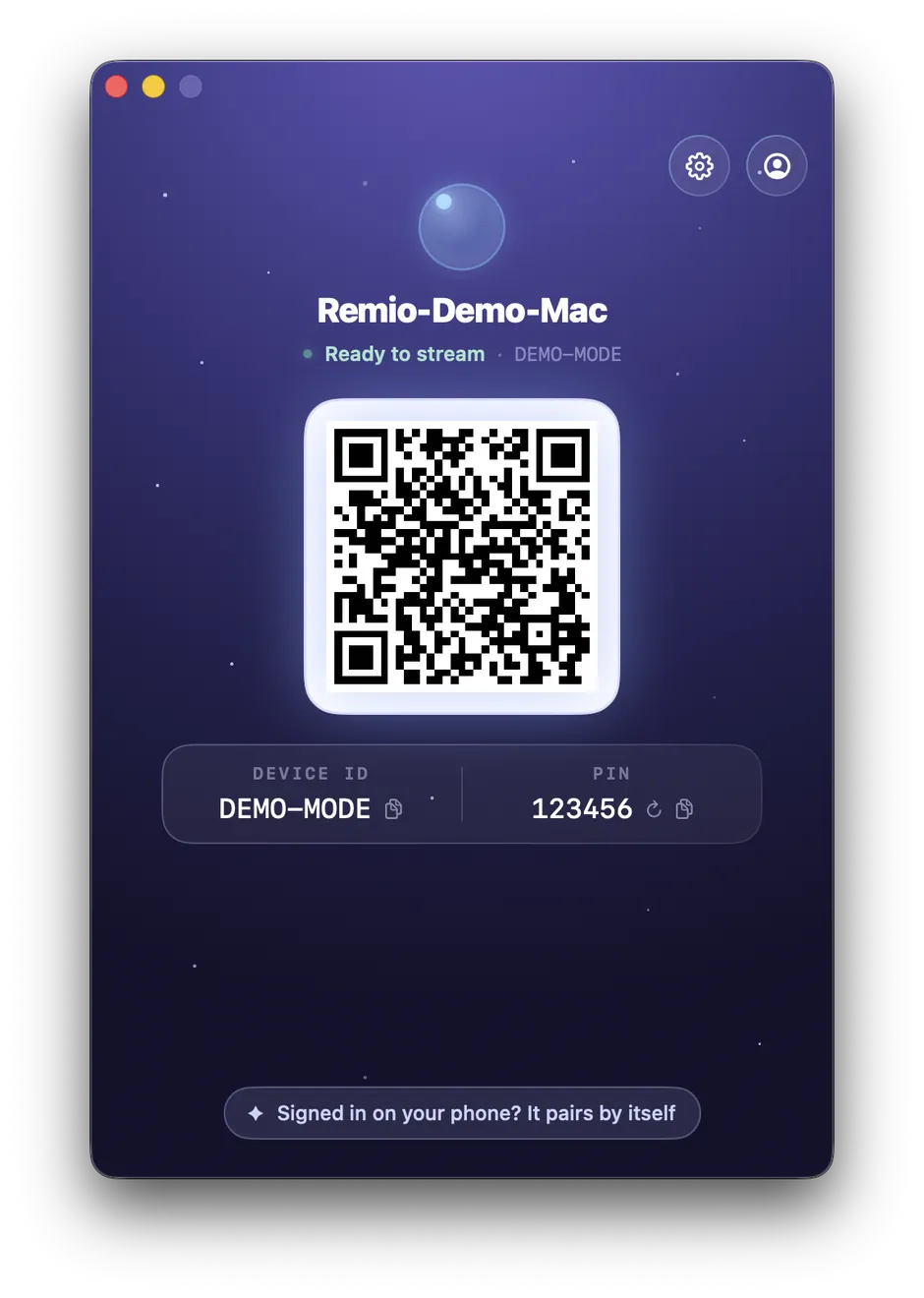
The Mac shows a one-time 4-digit PIN and a QR code. Scan or type it on the iPad. Pairing uses one-time keys with forward secrecy — no Apple ID, no iCloud, no account. On the local network the connection is direct iPad-to-Mac; a relay is only used, encrypted, when a direct path is blocked.

Latency

Latency that respects the M-series chip.

The iPad and the Mac share silicon and a hardware media engine — Remio just gets out of the way.

Sub-5 ms LAN, zero buffering

On the same network, input-to-pixel latency stays under 5 ms and glass-to-glass under 20 ms. Lost packets trigger a fresh keyframe request rather than a retransmit, so the pointer never falls behind your finger.

60 Hz standard, 120 Hz ProMotion

Every iPad and iPad Air runs a smooth 60 fps; a ProMotion iPad Pro pushes to 120 Hz when the Mac source can feed it. The stream matches the panel in front of you.

HEVC hardware decode

Every iPad since 2017 decodes HEVC in hardware, and Remio uses VideoToolbox with no software fallback — around 8–12% battery over a four-hour session on iPad Pro, the media engine barely warming.

The Mac's sound, in sync

System sounds, music, and video-call audio route back to the iPad speakers or AirPods in lockstep with the video, with frame-level lip-sync maintained.

Workflows

What you can actually do.

The larger canvas, keyboard, and Pencil make the iPad the client for real work sessions — not just a quick check.

01
Code & write

Xcode on the couch, with real keyboard shortcuts

Build, run, and read the Console over a Magic Keyboard — ⌘B, ⌘R, ⌘. all fire on the Mac. An hour of writing or a design review is genuinely comfortable on the iPad's larger canvas in a way the iPhone can't match.

02
Paint & edit

Photoshop and Affinity with full Pencil pressure

Brush dynamics — Shape Dynamics, Transfer, Brush Tip Shape — respond to real Pencil pressure and tilt, with your Mac's full plugin library and undo history intact. A two-finger tap is a right-click for the context menus you live by.

03
Edit & produce

Final Cut and Logic Pro, driven from the iPad

Scrub a 4K HEVC timeline with J/K/L, use the Pencil as a jog-wheel substitute in Final Cut Pro, and drive Logic Pro's transport and automation curves by touch — with the monitored audio arriving in sync through AirPods.

Second screen

When the iPad becomes a second screen instead.

Sidecar makes the iPad a secondary display of a nearby Mac signed into the same iCloud. Remio streams the full Mac desktop as the iPad's primary view — over Wi-Fi or cellular, on older iPads Sidecar won't touch, and to any Mac regardless of Apple ID. And if what you actually want is extra screen real estate, Remio can do that too: see how to use the iPad as a second monitor for the Mac.

Same host app, same one-time 4-digit pairing, same end-to-end encryption either way.

Remio Host window on the Mac showing the pairing QR code, Device ID and PIN
FAQ

Common questions about iPad to Mac.

Five questions the iPad-to-Mac direction tends to raise — honest answers below.

Does Remio need iCloud or an Apple ID to pair iPad with Mac?
No. Pairing uses a 4-digit PIN over the local network, with one-time keys and forward secrecy. No Apple ID, no iCloud, and no Remio account — nothing about you is stored on our servers.
Will Apple Pencil pressure and tilt work in apps like Procreate?
Yes. Pencil events forward to the host Mac as native tablet input with full pressure, tilt, and azimuth. Procreate, Photoshop, Affinity, and Fresco all receive 1:1 pen data — proper pressure curves, not a synthetic single-pressure stream.
Can I use the iPad keyboard and trackpad with my Mac?
Yes. Magic Keyboard, Smart Keyboard Folio, and trackpad input forward as native Mac keyboard and mouse events. Modifier keys, the function row, and gestures map cleanly — and the trackpad keeps its inertial scroll momentum, not crude wheel ticks.
How does Remio compare to Sidecar?
Sidecar makes the iPad a secondary display of a nearby Mac. Remio streams the full Mac desktop to the iPad as the primary view — it works over Wi-Fi or cellular, supports older iPads, and the Mac doesn't need to be the same one signed into iCloud. If you want extra screen space instead, see the second-monitor guide.
What happens to audio coming from the Mac?
Audio routes back to the iPad in sync with video. System sounds, music, and video calls all stream to the iPad speakers or AirPods, with frame-level lip-sync maintained.
Remio app icon

Bring your Mac to your iPad in thirty seconds.

Sub-5 ms latency, Apple Pencil pass-through, trackpad inertia, audio in sync — free, no account, no card. Average measured setup is 27 seconds.